Windows · Friends' beta
What channel is the game on?
Type it the way you'd say it. Theia searches your own playlist and guide and forgives the typo. You never have to add the “USA |” your provider puts in front of every channel. It's a full player too: Live TV, a real guide, movies and series, multiview.
- 205 Northfield Sports 2 Lakeport Otters at Northfield Owls listed as US| NFLD SPORTS 2 FHD Live ends 10:15 PM
- 431 Riverbend Sports 1 Otters at Owls, alternate commentary listed as UK: RIVERBEND SPORTS 1 HD Live ends 10:15 PM
- 007 Channel 7 Metro Otters Postgame Live listed as USA ▎CHANNEL 7 METRO HD 10:15 PM
Sample guide. Every channel and team name here is made up.
I built Theia because finding the game took twenty minutes. It started as a search box and grew into the player I wanted.
Jeff, who makes Theia
Provider names like “US| NFLD SPORTS 2 FHD” show up in Theia as “Northfield Sports 2”.
Guide
A guide that keeps the picture playing
The channel you're watching stays in a preview above the grid while you look around. Scroll hours ahead or jump back to now. Nothing starts playing until you pick it.
Shows that already aired stay on screen, dimmed, with a small ring when your provider offers catch-up. Color bars mark sport, news, film, factual and kids, and you can turn them off if you’d rather have a plain grid.
The grid has seven sizes, from dense to readable across the room. The default is roomy enough to read from the couch.
205 Northfield Sports 2
Lakeport Otters at Northfield Owls
7:00–10:15 PM · 2 h 33 m left
NEXT Otters Postgame Live
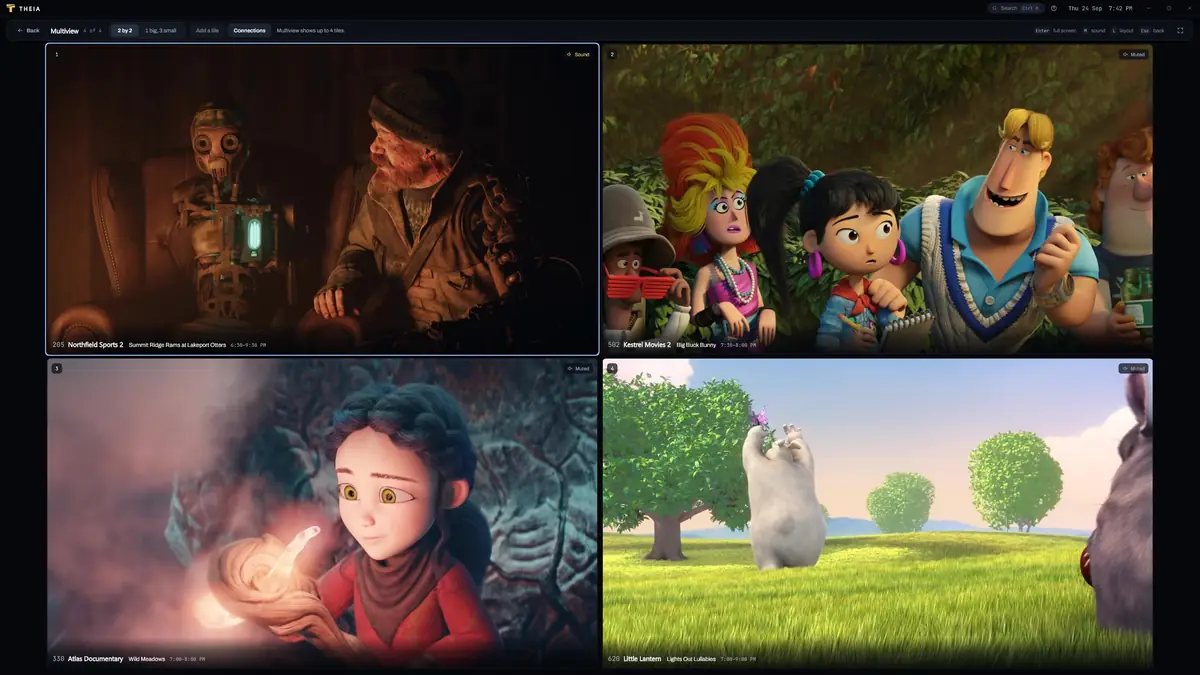
Multiview
Four streams on one screen
Put up to four channels side by side and choose which one you hear. It's the Sunday afternoon feature.
Each tile uses one connection from your provider. Theia checks how many your account allows and warns you before you open a tile it can’t fill.
Free users get a 10-minute multiview preview a day, so you can find out what your provider allows before you pay for anything.
Premium Free users get a daily preview
Built for Windows
Keyboard first, and steady at 40,000 channels
Theia is a Windows app with hardware video decoding. It's built and tested against a 40,000-channel playlist, so the channel list, the filter and the guide keep up while you type.
Every screen works from the keyboard, and the shortcuts are listed and remappable in Settings.
- CtrlK
- Search from anywhere
- F
- Full screen
- CtrlD
- Favorite this channel
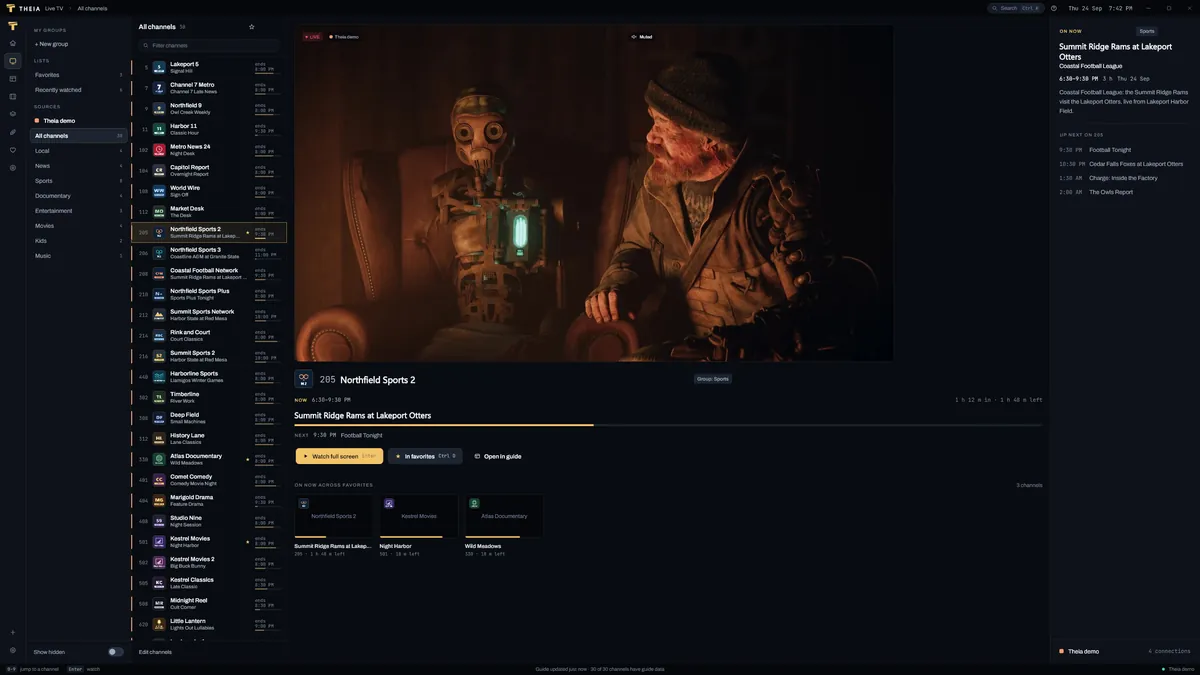
Also in Theia
The rest of it
- Live TV browsing Channel groups with what’s on now and how long is left, without hovering or guessing.
- Movies and series Your provider’s library with posters, seasons, and a resume point for everything you start.
- Live rewind Pause a live channel, go back over what’s still in memory, then jump to live again. It’s a fixed amount of memory, so a high-bitrate channel holds less of it.
- Catch-up Watch shows that already aired, on channels where your provider supports it.
- Favorites and recently watched Star a channel with Ctrl D and it’s one click away.
- WireGuard or proxy routing Send Theia’s connections through a server you set up, without touching the rest of your PC.
Privacy
Nothing to sign up for. Your logins stay on your PC.
Provider passwords are encrypted by Windows and never leave your computer. Streams travel straight from your provider to you, so I never see what you watch.
Stays on your PC
- Provider logins, encrypted with Windows data protection
- Playlists, guide data and channel lists
- Favorites, history and anything you search for
- Log files, unless you attach one to a problem report
What Theia sends
- No crash reports and no usage counts. The switches are in Settings, and nothing is behind them yet. Before a release sends anything, the privacy policy will say who receives it and for how long. In the EU and Switzerland, Theia asks first.
- An update check with the app's version number
- Public sports schedule lookups, which you can switch off
Pricing
Free to use. Pay once for the extras.
Search, the guide and everyday watching are free with no ads. Premium is a single payment that covers three PCs.
| Free$0No ads, no time limit | Premium$19.99Launch price, then $24.99 One payment · 3 PCs | |
|---|---|---|
| Sports search and scores | ||
| Guide with live preview | ||
| M3U playlists and Xtream logins | 2 sources | Unlimited |
| Multiview | A 10-minute preview a day | 2 to 4 streams |
| Sync between your PCs | – | |
| Use on | Any PC | 3 PCs |
Premium unlocks app features only. It includes no channels or streams. Not on sale during the beta.
What's next
Windows first. You pick the next platform.
Windows is in a friends' beta. Join the waitlist and pick where you'd watch next. Votes decide what comes after.
Questions
Before you ask
More on the support page.
Does Theia come with channels?
No. Theia is a player, and it includes no channels, streams or playlists. You add a playlist link (M3U) or an Xtream Codes login from a service you already use. Buying Premium unlocks app features only.
What do I need to use it?
A PC running Windows 10 or 11, plus an M3U playlist link or Xtream Codes login. If your service gives you a guide link (XMLTV), add that too. Theia will match it to your channels.
Can you recommend a provider?
No. I don’t recommend, sell or partner with any provider, and I won’t answer that question in support. Theia works with whatever sources you already have the right to watch.
How does search find the game?
It reads the guide from your own sources, and if you leave it switched on, a public sports schedule. Team names and nicknames match, small typos are fine, and country prefixes like “US|” are ignored. Results only ever include channels in your own playlists.
Why does multiview need more connections?
Every tile is a separate stream, and providers count each stream as one connection. If your account allows two connections and a TV in another room is using one, you can fill one tile. Theia shows the number before you start, and the free preview (10 minutes a day) lets you check before buying Premium.
Is Premium a subscription?
No. Premium is one payment that covers three PCs at a time, with updates included. Remove from this PC in Settings > Premium clears the key from a machine so you can use it on another. It isn’t on sale during the beta.